

FOR TALENT
Blog Explore the trends. Codebrew Stay up to date. Interview Questions Get prepared. Coder Glossary Learn the concepts. Portfolio Showcase your projects. University Preferences Make the right choice. Roadmap Move forward step by step. Cheat Sheets Look up the shortcuts. Free Software Tools Get a hand. Podcast Listen on the go. Salaries Learn what the market pays. AI Tools Explore AI.FOR COMPANIES
Blog HR trends. Codebrew Stay in the loop. HR Webinars Hear from the experts. Case Studies Get inspired. E-book Download the guides. HR Calculation Tools Calculate with ease.

Devin AI
An autonomous AI tool capable of managing end-to-end software development, testing, and debugging processes.

Cognition defines its product, Devin, as "The World’s First Fully Autonomous AI Software Engineer."
This is because Devin AI doesn't just perform software tasks; it can also train its own AI models. This positions Devin AI as not just an assistant, but as a fully autonomous, self-sufficient AI that works as a productive software engineer.
In fact, a few years ago, Devin AI even attempted to apply for real job listings as a software developer on the freelance platform Upwork.
"So, what can Devin AI do?" Let’s explore the answer to this question in this article.
What is Devin AI?
Devin AI is a cloud-based coding tool developed by Cognition, designed to help developers streamline their workflows, boost productivity, and produce higher quality code.
Devin can write code, fix bugs, run tests, and even generate reports. To carry out all of these tasks, it can use its own browser to search for information on the web.
Its working process is quite simple: all you need to do is enter a command into Devin's terminal. After that, Devin creates a plan and follows it. Of course, errors can occur during the process, and in such cases, you can add another command via the chat section to guide Devin.
Another great feature of Devin is its integration with GitHub accounts, allowing it to access and clone repositories to work directly on them.
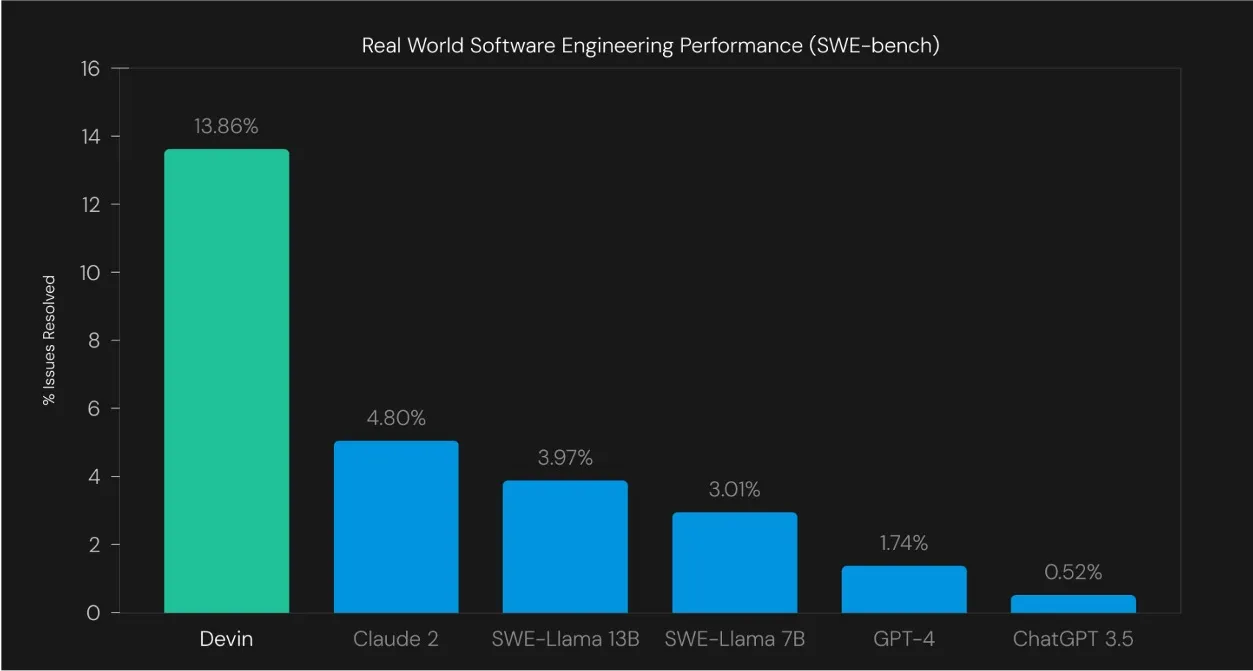
According to the company's SWE-Bench technical report, Devin AI has a 13.86% success rate in solving software issues on GitHub, which is higher than both older versions and current AI models. For example, the second-place AI, Claude 2, only achieves 4.80% success. Models like SWE-Llama 13B, SWE-Llama 7B, and GPT-4 perform even worse.
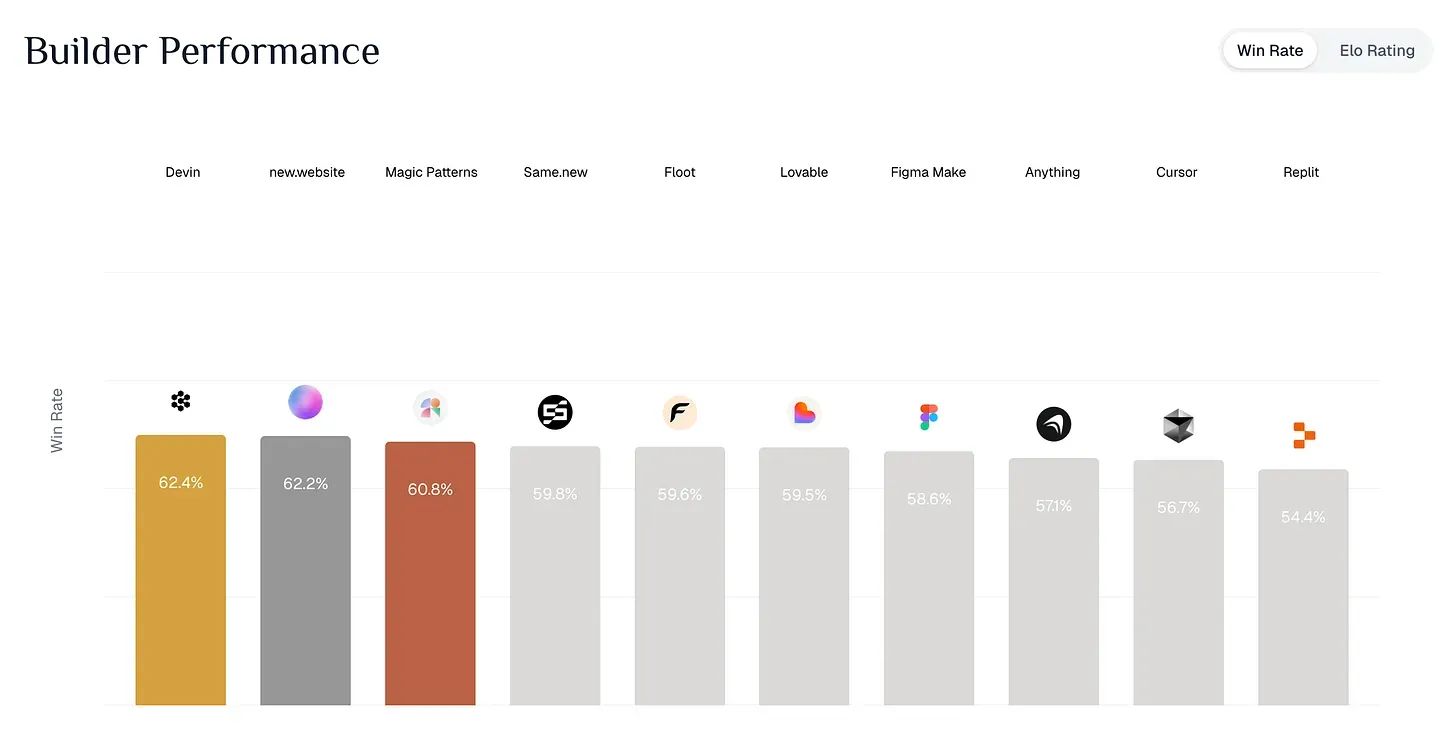
In the Builder Arena, a testing environment for AI tools, Devin tops the leaderboard with a 62.4% win rate, which is the highest success rate overall.
How Does Devin AI Work?
How does Devin AI work, with its ability to automate tedious tasks, detect errors, and optimize performance? Let’s take a closer look at this topic.
Devin AI uses machine learning algorithms to analyze code, identify patterns, and provide suggestions.
Essentially, Devin collects large amounts of data from various sources, ranging from structured databases to unstructured text documents. Through advanced algorithms and models, it processes this data, identifies patterns, and produces actionable insights that support conscious decision-making processes.
Where Can We Use Devin AI?

The key use cases for Devin AI include:
- Advanced analysis tools: Provide detailed information about code quality, performance, and security vulnerabilities.
- Automating repetitive coding tasks: It uses machine learning to save time by automating routine tasks.
- Collaborative features: It offers strong real-time project collaboration and seamless communication within teams.
- Innovative development support: It provides powerful capabilities to improve and innovate software development processes.
Examples of Use Cases:
- Gradual system updates:
For example, if you want to upgrade an old Node.js project to a newer version, Devin can manage this process. It runs tests, updates dependencies, and fixes any errors step by step. - Clearly defined tasks:
If you have a defined issue on GitHub or a task in a system like Jira, Devin can plan, code, test, and complete the task. - Non-code but time-consuming tasks:
Tasks like reformatting documents, setting up CI/CD, or formatting multiple files can be tedious. Devin is very helpful for such tasks. - Tasks requiring speed:
Cognition claims that thanks to Devin's advanced decision-making abilities that reduce the need for repetitive problem-solving, it can complete tasks up to 80% faster than before.
Devin AI vs GitHub Copilot: Which Is Better?
|
Feature |
Devin |
GitHub Copilot |
|
Approach |
Handles tasks end-to-end (planning, coding, testing, PR) |
Provides real-time code suggestions |
|
Autonomy |
High – Handles the task from start to finish |
Medium – Requires user guidance, improves with Agent Mode |
|
Speed |
Slower – Runs tests and validates changes |
Very fast – Instant suggestions |
|
Memory |
Remembers project context for a long time |
Session-based – Context is lost when the IDE is closed |
If you want to fully delegate tasks to an AI or automate repetitive work in large projects, Devin AI might be more useful compared to GitHub Copilot.
If you need real-time assistance while coding, quick prototyping, small fixes, or learning a new language, GitHub Copilot might be a better choice than Devin
FAQ
Devin AI is the world’s first fully autonomous AI software engineer, developed by Cognition, capable of autonomously managing software development processes.
- Write and fix code
- Run software tests
- Update versions in existing projects
- Configure CI/CD pipelines
- Organize project documentation
- Work directly on GitHub repositories with integration
- Complete tasks defined in systems like Jira
Discover other AI tools
All tools
Amazon Q Developer
An AWS-focused AI tool that supports coding processes and enhances the developer experience.

OpenAI Codex
OpenAI Codex is an AI engine that can generate code from natural language commands and understands multiple programming languages.

Gemini
Gemini is a family of multimodal AI models developed by Google.
